|
|
|
Main > Utilities >
System utilities
>
RunViewer |
|
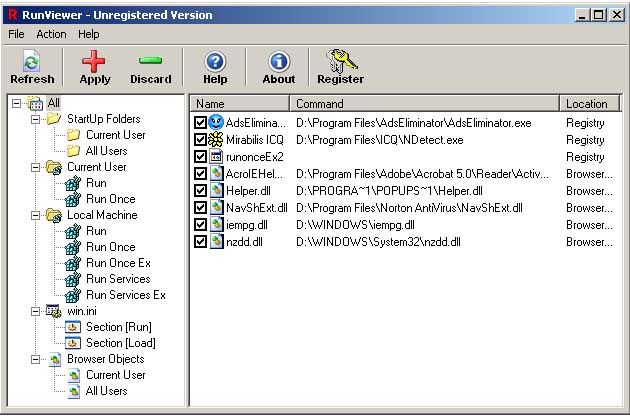
RunViewer is a simple utility which allows you to see and disable programs your Windows and browser runs at startup. You can see the list of programs you have in various places of windows registry and remove the program from startup, if you don't want it to be started when you logon to windows or start your browser. Speed-up Windows boot time and increase computer performance by disabling useless programs. Virus programs, and worms also can add
themselves to startup list, write themselves into the run registry keys, StartUp Folders or win.ini file.
RunViewer helps you to find and disable spying programs and other software that you can't turn off without knowing right registry keys. If you has some sleazy web site taken over your browser, or getting pop up ads even when your browser has been closed for some time this can mean, that you was forcibly hijacked by malicious web sites. RunViewer
shows you what objects where added to your browser and allows to disable them, if you'll find them dangerous. |
|
Buy Now |
|
Key features
of RunViewer:
-
Allows you to see and disable
programs your Windows and browser runs at startup.
-
Helps you to find and disable spying
programs and other software that you can't turn off without
knowing right registry keys.
-
Shows the list of programs you have
in various places of windows registry.
-
You can remove the program from
startup, if you don't want it to be started when you logon to
windows or start your browser.
RunViewer screenshot:
 |
|
|
Product
Information
|
-
Version:
1.02
-
Price:
$14.95
-
Size:
0,4MB
-
License:
Shareware
-
Developer:
DevelopEx
-
OS:
Win95, 98, ME, NT 4.x, XP, 2000
-
Rating:

|
|
|
|