|
|
|
Main > Utilities >
System utilities
>
PC Atomic Sync |
|
The main idea of
the program is to synchronize your PC's clock in the most
reliable and resource-saving way.
The unique Time Offset feature of the program allows
setting up your PC clock to gain or to lose for a specified
interval. Many our users value this feature greatly.
Clock in your PC needs to be corrected only several times a
month. And it is this fact that defines the way the program
works: the program runs when Windows starts, checks whether
synchronization has been done this day already, and stops
immediately if so. Otherwise the program checks for Internet
connection, then tries to synchronize your clock and ends its
work if succeeded. So as you see mostly the program is idle and
is not wasting resources of your PC. Synchronization is done
automatically while you are receiving your e-mail or surfing the
web and no actions are to be done by you.
The program features noteworthy reliability. You can
specify the correction period during which the program should
synchronize your clock. If it fails user gets a warning
notification message. |
|
Buy Now |
|
Key features
of PC Atomic Sync:
-
Synchronizing PC clock with atomic
clock using official Sources of Time for the United States and
other countries.
-
Standard NTP synchronizing protocol.
-
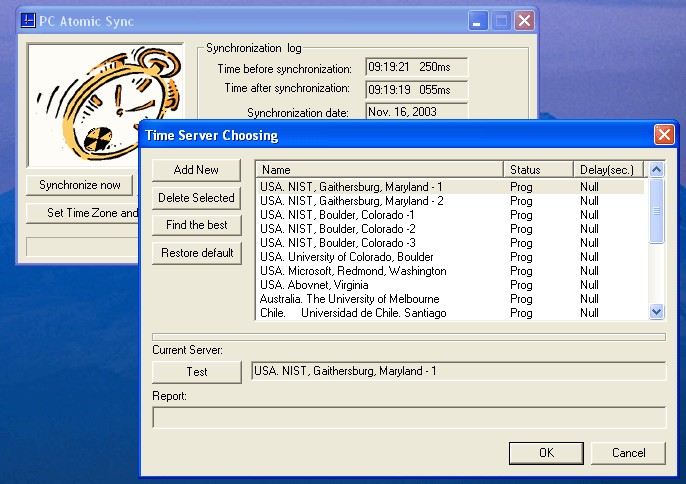
19 presetting time servers.
-
Server adding/deleting possibility.
-
Manual and automatic daily
synchronization.
-
Current System Date control and
correction.
-
Net response delay correction.
-
Control of synchronization quality.
-
Time Offset feature: make your clock
to gain or lose the way you want.
-
Minimal usage of PC's resources.
PC Atomic Sync screenshot:
 |
|
|
Product
Information
|
-
Version:
4.0
-
Price:
$10
-
Size:
0.77MB
-
License:
Shareware
-
Developer:
Alex Rest
-
OS:
Win95, 98, ME, NT
4.x, 2000, XP, 2003, Vista 
|
|
|
|