|
|
|
Main >
Utilities
>
System Utilities
> Mouse Clock(TM) |
|
THE
ULTIMATE MOUSE ENHANCEMENT UTILITY: Mouse Clock (tm) for Windows.
Mouse Clock virtually becomes part of your mouse pointer. It stays
out of the way, while providing you with the current time and free
system resources as well as the date. NOW SUPPORTS A RATE CLOCK!
Imagine having all the rate information you need-- WHENEVER YOU
NEED IT. Works great for Tech-Support Lines, On-Line Services, and
other hourly services. Can stay on top. TOTALLY configurable.
24-HR TIME supported.
MouseClock is the only Internet-enabled mouse cursor enhancement
you'll ever need! MouseClock becomes part of your mouse pointer
and provides you with the information you need in a novel way. It
stays out of the way, while providing you with the current time,
date, free system resources, seconds (stopwatch), how many new
e-mails you have, and also provides a rate timer.
|
|
Buy Now |
|
Key features
of Mouse Clock(TM):
-
MouseClock virtually becomes part of your mouse pointer.
-
It
stays out of the way, while providing you with the current time and
detailed free system resources.
-
MouseClock will run right from the system tray -- next to the clock --
without interfering with any of your work or applications.
-
MouseClock will alert you when you have new e-mail -- and tell you
just how many new e-mails you have.
-
MouseClock also features a rate clock -- In a professional that gets
paid hourly?
-
Why not
keep your rates straight with the MouseClock rate clock? Perfect for
online services, or any other timed service.
-
Supports 24-hour Internatinal format.
-
Can
automatically play a WAV sound file of your choice when a new e-mail
arrives.
-
Can
download and display your local temperature and weather --anywhere in
the world!
-
Can
stay on top, or be put behind other windows when you no longer require
its use.
-
Easy to
use and fully configurable. Change the colors, fonts, font sizes and
more!
-
Full
Help Included!
System
Requirements:
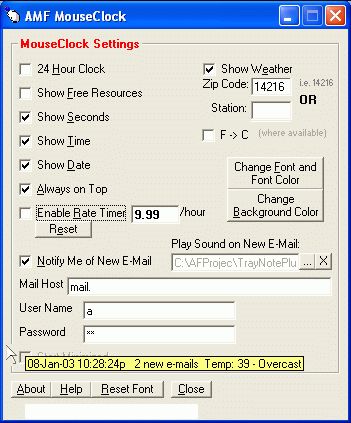
Mouse Clock(TM)
Screenshot:
 |
|
|
