|
|
|
Main > Utilities >
System utilities
>
Cursor Hider |
|
 Cursor Hider helps you to do a little less of
action during working with computer. It removes the mouse
pointer from an user focus at a working area so the mouse cursor does not cover the text or
picture that you see. Pointer disappears when user keystrokes or after a some
seconds without mouse activity. With any mouse action mouse pointer shows at its place. Real
example: You are going to visit a web site with form to fill it. At first you type the URL in the
browser address bar - www.softxee.com. But mouse pointer blocks char (period) and you do not know
exactly typed it or not. To check that you must take the mouse
device to hand and do move action so mouse pointer move out from focus area. With
Cursor Hider the mouse pointer disappears with first keystrokes and
nothing will block the typed text now. Furthermore You can turn off the mouse
pointer (do cursor invisible) . This is the very useful option for touch
screen devices and kiosk applications. User will not see the cursor at all! Cursor Hider helps you to do a little less of
action during working with computer. It removes the mouse
pointer from an user focus at a working area so the mouse cursor does not cover the text or
picture that you see. Pointer disappears when user keystrokes or after a some
seconds without mouse activity. With any mouse action mouse pointer shows at its place. Real
example: You are going to visit a web site with form to fill it. At first you type the URL in the
browser address bar - www.softxee.com. But mouse pointer blocks char (period) and you do not know
exactly typed it or not. To check that you must take the mouse
device to hand and do move action so mouse pointer move out from focus area. With
Cursor Hider the mouse pointer disappears with first keystrokes and
nothing will block the typed text now. Furthermore You can turn off the mouse
pointer (do cursor invisible) . This is the very useful option for touch
screen devices and kiosk applications. User will not see the cursor at all! |
|
Buy Now |
|
Key features
of Cursor Hider:
-
Minor changes in the hiding part.
-
Fixed incompatible with Miranda IM
ICQ window, OpenOffice.org "Save as.." dialog window New
registration key required.
Contact support to free update registration key.
-
Added compatible keyboard layout
changing operation with Mindjet MindManager
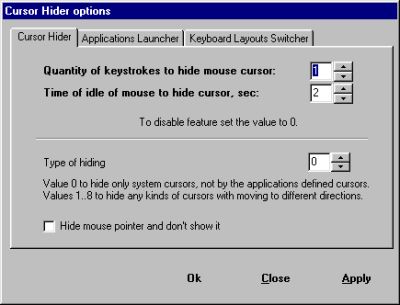
Cursor Hider screenshot:
 |
|
|
Product
Information
|
-
Version:
1.4.9.9
-
Price:
$19.95
-
Size:
0.27MB
-
License:
Shareware
-
Developer:
Softexe.com, CIT AdaSoft
-
OS:
Win98, ME, NT 4.x,
2000, XP, 2003, ME, Vista
-
Rating:

|
|
|
|