|
|
|
Main >
Utilities
>
File & Disk Management > Quick File Renamer |
|
 As
you know, Windows doesn't make it very easy to rename files. For
each file, you have to right-click and select "Rename", or try
double-clicking the file very slowly in order to edit it. Then you
have to delete the old name and type in the new one. As
you know, Windows doesn't make it very easy to rename files. For
each file, you have to right-click and select "Rename", or try
double-clicking the file very slowly in order to edit it. Then you
have to delete the old name and type in the new one.
If you want to change the file extension, you have to deal with
annoying popup messages like "Are you sure you want to change the
file extension"?
With more than five or ten files, this can become a nightmare!
Here is the solution! A quick way to rename as many files as you
want in just seconds!
As one Download.com reviewer puts it:
"Quick and to the point. This app is great if you need to rename
file quick and in a hurry. No funky features to get in the way."
|
|
Buy Now |
|
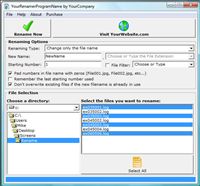
Key features
of Power Quick File Renamer:
-
Change the file name
-
Change the file
extension
-
Auto-Incrementing
-
Pad File Names with
Zeros so that they names sort correctly
-
Can rename thousands of
files in a few seconds!
-
Saves all your settings
so you don't have to enter them every time the program is run!
Quick File Renamer
Screenshot:
 |
|
|
Product
Information
|
-
Version: 2.0
-
Price:
$14.95
-
Size:
2.64 MB
-
License:
Shareware
-
Developer:
Rebrand Software
-
OS:
Wind
9x,
2000, ME, XP, VISTA
-
Rating:

|
|
|
|
