|
|
|
Main >
Utilities
>
Antivirus
> WinShredder - erase
internet history |
 WinShredder
gives you the ability to erase internet history, permanently
delete files and protect privacy for you. WinShredder
gives you the ability to erase internet history, permanently
delete files and protect privacy for you.
With technology (Patent 5022.22M )
approved for use by both the U.S. Department of Defense (D.o.D.)
and the U.S. National Security Agency (N.S.A.) you are getting
military-grade protection.
WinShredder comes with 1 year free
updates and free technical support.
With WinShredder you'll be able to
permanently erase:
- deleted files
- chat transcripts
- audio and video files
- temporary internet files
- image files (all formats)
- clipboard data
- search histories
- passwords
- internet history
- cookies
Why do you need WinShredder?
Because your Windows Recycle bin only deletes the file that you
see ... not the actual data on your harddrive. Until the file
location on your hard disk is overwritten many times, the files
can be completely recovered using many available computer
programs, or even simple computer commands. Deleted files are the
first thing hackers, privacy thieves, and other computer experts
look for when they are trying to recover sensitive information
from your computer or discarded disks. Also, employers routinely
search for 'deleted' files to discover information about
employees.
|
|
Buy Now |
|
Key features
of WinShredder - erase internet history:
- Unlimited Shredding
Most competitor products limit the user to only 1, or to a fixed
number of data wipes when shredding. WinShredder permits an UNLIMITED
number of data wipes. Want to shred that file 10000 times? No problem!
- Unlimited 'Do Not Shred' Folder
Locations
A serious flaw in most competitor products is the inability to protect
important folders from accidental shredding. This disastrous problem
is solved with WinShredder. WinShredder permits an unlimited number of
'Do Not Shred' folder locations to be defined, protecting them from
accidental shredding.
- Drag and Drop to the Desktop Trashcan
WinShredder supports all Windows drag and drop features. You can Shred
files or folders simply by dragging them to the desktop WinShredder
Trashcan.
- Windows Explorer Integration (Right
mouse-click menu integration)
WinShredder integrates with all versions of the Windows operating
system and appears as a new 'Delete with WinShredder' menu option,
complete with icon, when right mouse-clicking on a file or folder.
- Optional Instant Shredding
Turn on the 'Instant Shred' option and you can start the shred process
instantly just by dragging files to the desktop WinShredder trash can.
- No 'lock-ups' while Shredding
Many competitor products lock up your computer while they are
shredding files. While they are shredding files, you cannot move your
mouse or open another program, or, your mouse is jerky and
intermittent. Not WinShredder! You can continue to work while
shredding is underway, seamlessly and smoothly.
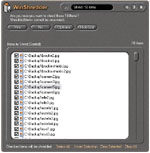
WinShredder - erase internet history
screenshot:
|
|
|
