|
|
|
Main
> Software
Development > Tools & Editors
> Help Generator for Microsoft Access, Help Generator for Visual
Studio 2003 |
|
The best way to make
documentation available with your Microsoft Access application is by adding
a help file. By pressing F1 or the Help button the user immediately gets the
info he is looking for.
The Help Generator for Microsoft Access greatly simplifies making help files
and user documentation. No special help authoring expertise is needed to
create help file. The Help Generator not only lets you make the online Help,
but also user and technical documentation in Word. |
|
Download(Microsoft) |
Buy Now(Microsoft) |
|
Download(Studio) |
Buy Now(Studio) |
|
Key features
of Help Generator for Microsoft Access:
-
The wizard lets you set
many options for page layout and application specific information.
-
It's easy to
understand, clear and intuitive user interface makes it very easy to
use.
-
Just download it to
have a try, you will love it.
-
MS Access HTML Help
generator creates context sensitive HTML Help integrated with your MS
Access applications in seconds.
-
Features HTML page and
image generation, table of contents, index and search, images with
hotspots.
-
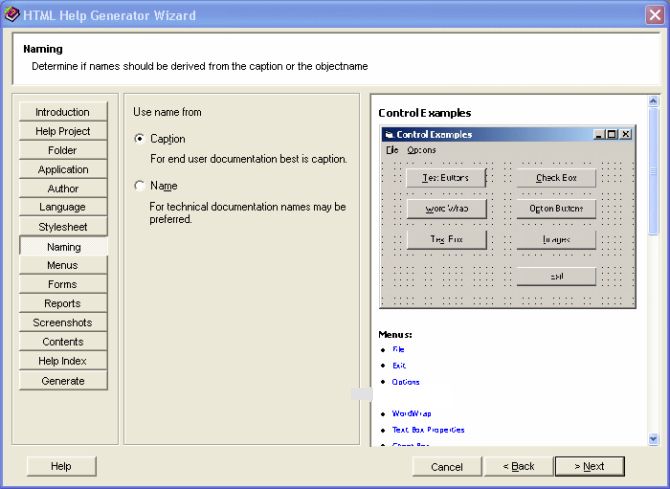
Names used in HTML
pages can be either captions or object names.
-
Configuration from last
run is saved and auto loads on start-up.
-
Finished and wrong
files are cleaned automatically.
System
Requirements:
-
32M RAM
-
25M free Hard-disk
space
Help
Generator for Microsoft Access screenshot:
 |
|
|
Product
Information
|
-
Version: 3.0
-
Price:
$299.00
-
Size:
3.7
MB
-
License:
Shareware
-
Developer:
Code-VB
-
OS:
Windows 98, ME, NT,
2000, XP, 2003
-
Rating:

|
|
|
|