|
|
|
Main
> Business
& Finance >
Spread Sheets
> Text Manager |
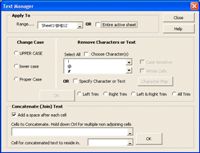 The Text
Manager will make working with text in your spreadsheet very easy. It is
particularly useful for text which has been imported into Excel. You specify
the range to affect, this can be specified cells or the entire sheet. The Text
Manager will make working with text in your spreadsheet very easy. It is
particularly useful for text which has been imported into Excel. You specify
the range to affect, this can be specified cells or the entire sheet.
The Change Case lets you instantly change the case of your text. You can
nominate to change your text to all UPPER CASE, all lower case, or Proper
Case.
The Remove Character or Text can save you many hours of manually removing
specific characters, or text, from specified text. You can even copy the
characters to remove directly from the Windows Character Map. If the
character or text you wish to remove is not available, simply check the
Specify Character or Text option.
One very common problem with text (particularly imported text) is the
unavoidable importing of spaces. Not only does this make your text unsightly
and hard to read, but it can also prevent:
- Numbers not being seen as true numbers.
- Dates not being seen as true dates.
- Hard or impossible to break up text.
- Hard or impossible to reference text.
- Hard or impossible to use text in formulas.
You can remove all Leading spaces, Trailing spaces, Trailing and Leading
spaces, or All spaces, except for single spaces between words.
Have some text you wish to concatenate (link together)? The Text Manager can
do this is quickly and easily. Simply specify the cells to concatenate, then
specify the cell to concatenate the text into and click OK. Your text will
instantly be joined. You can also tell the Formula Manager to add a space
between each cell that is joined. |
|
Buy
Now |
|
Text
Manager screenshot:

|
|
|
Product
Information
|
-
Version: -
-
Price:
$29.95
-
Size:
MB
-
License:
Shareware
-
Developer:
Dave Hawley
-
OS:
Windows
-
Rating:

|
|
|
|
