|
|
|
Main >
Utilities
>
Optimizers & Diagnostics
> MemoryBoost |
|
 MemoryBoost
frees unused memory, making your computer run faster and more
reliably. Windows lets closed programs stay in memory; that's why
you have to reboot your computer to keep the performance up.
MemoryBoost solves this problem by reclaiming unused memory for
your applications. They can run faster, and Windows has less work
to do, resulting in more stability for your programs and system as
a whole. MemoryBoost itself is small and lightweight; it does not
install any new system drivers or anything else that could
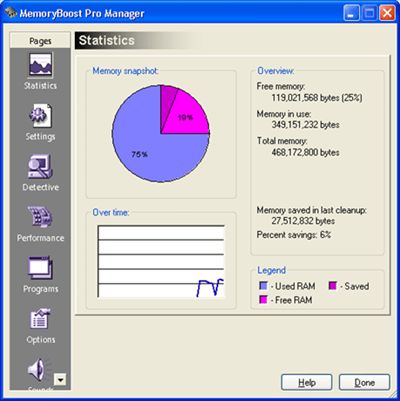
destabilize your system. It also provides in-depth statistics and
a history of memory-usage, so you can see how much MemoryBoost has
helped your computer. MemoryBoost
frees unused memory, making your computer run faster and more
reliably. Windows lets closed programs stay in memory; that's why
you have to reboot your computer to keep the performance up.
MemoryBoost solves this problem by reclaiming unused memory for
your applications. They can run faster, and Windows has less work
to do, resulting in more stability for your programs and system as
a whole. MemoryBoost itself is small and lightweight; it does not
install any new system drivers or anything else that could
destabilize your system. It also provides in-depth statistics and
a history of memory-usage, so you can see how much MemoryBoost has
helped your computer.
|
|
Download |
Buy Now |
|
Key features
of MemoryBoost:
-
Protects you from crashes. MemoryBoost warns you when system resources
get low - allowing you to close some programs before they crash.
-
Automatically frees up memory, improving performance. You can leave
MemoryBoost running and forget about it, assured that it is maximizing
your computer's speed.
-
Shuts
down "junkware," software that eats system resources without benefit.
-
Provides easy-to-read statistics on your computer's memory use. You
can see at a glance how well your computer is performing.
-
Detective feature shows you how much of your memory each running
program is using. That way, you can shut down larger programs if
resources get low.
MemoryBoost
Screenshot:
 |
|
|
Product
Information
|
-
Version: 2.60
-
Price:
$19.95
-
Size:
1.78
MB
-
License:
Shareware
-
Developer:
Tenebril Inc.
-
OS:
Win
95, 98, ME, NT, 2000, XP
-
Rating:

|
|
|
|
