|
|
|
Main >
Utilities
>
File & Disk Management
> File Recover |
|
 File Recover is a safe, affordable and easy-to-use file and data
recovery solution, designed to recover and restore deleted files
from hard drives, floppy drives and other types of fixed media. File Recover is a safe, affordable and easy-to-use file and data
recovery solution, designed to recover and restore deleted files
from hard drives, floppy drives and other types of fixed media.
File Recover allows you to recover critically important documents,
or other files, which have been lost by accidental deletion. These
files may be lost by emptying the Recycle Bin, or using other
deletion actions that bypass the Recycle Bin altogether. Such
actions include Windows Shift-Delete, command line deletion,
deleting excessively large files or using applications that delete
files without the Recycle Bin.
When a file is deleted from the Recycle Bin, or if the recycle bin
is bypassed altogether, the file can no longer be recovered by the
Windows Operating system. The content of the file still remains on
the drive, relatively intact, until the section of the drive it
occupies is overwritten by another file.
File Recover identifies the contents of such lost files on the
hard drive and allows you to recover them. If a file has been
partially overwritten, File Recover attempts to reconstruct as
much of the file as possible with the remaining contents. This
allows you to salvage at least part, if not all, of that recovered
file to continue using it as required.
|
|
Buy Now |
|
Key features
of File Recover:
-
Recovers files instantly from hard drives, floppy drives and other
types of fixed media. If you are a home user or a network
administrator, File Recover fills a critical gap in your data
protection strategy.
-
Rapid scan engine - a typical hard drive can be scanned for
recoverable files within minutes.
-
Scan all files and directories on selected hard drives.
-
Search for a recoverable file using part or all of its file name.
-
Utilizing a non-destructive, read-only file recovery approach.
-
File Recover will not write or make changes to the section of the
drive from which it is recovering data.
-
Batch file recovery (recovers multiple files in one action).
-
Works around bad-sector disk areas. Recovers data where other programs
fail.
-
Supports standard IDE/ATA/SCSI hard drives, including drives larger
than 8 GB.
-
Supports hard drives formatted with Windows FAT16, FAT32 and NTFS file
systems.
File Recover
Screenshot:
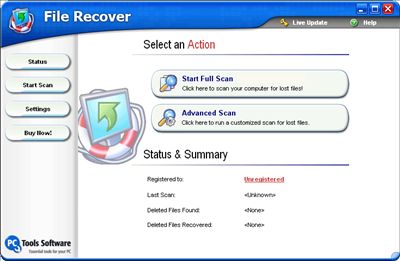 |
|
|

