-
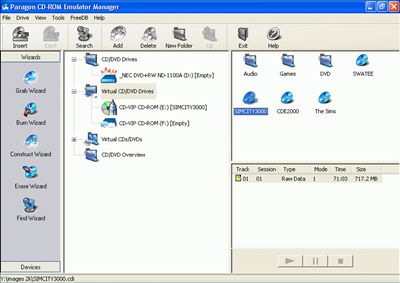
Up to 20 virtual CD drives at the same time - play
the virtual audio CD in background and use your favorite CD
application.
-
CD Images can be placed on the network drive.
-
An ability to Import &
Export ISO images.
-
Choosing driver letter
for virtual drives.
-
Dynamic adding and
removing virtual drives.
-
"Autoinsert" feature: on each startup of operating system all
virtual drives will have those images inserted, which were in them
upon previous restart/shutdown.
-
Compression for images.
-
Image properties
(including information about tracks included).
-
Option "Mount for current user/Mount at system startup" in drive
properties gives you extra flexibility in configuring system.
-
Importing and exporting
of separate tracks.
-
CD Image Builder – select files or whole directories and create
ISO9660 compatible image.
-
"Auto Run" setting – define whether virtual drive should "AutoRun" CD
when image inserted or not.
-
Edit CD Images stored
on the hard disk. One can patch files on CD.
-
Hot keys – define
special keys to load specific CD Image automatically.
-
Read CDs in RAW-Mode – bypasses some copy-protection and allows to
create backup CD Image.
-
Works with ISO Data CDs, DVD-ROMs (more than 4 Gb now!!!),
Video CDs, Multisession CDs and Mixed Mode CDs.
-
No need to use physical CD – if application requires original CD in
CD
-
Drive – just put CD
Image into virtual CD Drive.
-
Supports CDDB – the content of Audio CD will be loaded over the
Internet. It contains CD description, list of titles and author
information.
-
CD Image Builder allows to create Multisession CD Image and therefore
update some files on CD without creating CD Image from the scratch.
 Paragon CD-ROM Emulator is very helpful utility designed
for creating and managing virtual CD/DVD drives and CD/DVD
images. These virtual drives are much more convenient,
reliable and quicker than physical ones. Their speed is even
ten times faster than the one while working with the best
physical CD/DVD-ROMs. They are silent, consume no power and don't
take time for CD swapping and speeding-up.
Paragon CD-ROM Emulator is very helpful utility designed
for creating and managing virtual CD/DVD drives and CD/DVD
images. These virtual drives are much more convenient,
reliable and quicker than physical ones. Their speed is even
ten times faster than the one while working with the best
physical CD/DVD-ROMs. They are silent, consume no power and don't
take time for CD swapping and speeding-up.