|
How does
the Acronis Universal Restore features work?
The feature continues the Acronis True Image benefit of being easy to use.
In order to use this option effectively, you must first prepare your
Acronis True Image environment.
Preparation
-
Step 1:
Install the Acronis Universal Restore option. Please note that Acronis
True Image 9.1 must be licensed and installed for Acronis True Image
Universal Restore to function.
-
Step 2:
Create bootable media with the Universal Restore option selected.
Now
you are ready to replace any system!
Restoration with Acronis Universal Restore (You can restore an image to a
new system in 5 easy steps.)
-
Step 1:
Boot your replacement system with the bootable media you created and
select Recovery in the Acronis True Image menu.
-
Step 2:
Select the image to restore and the Acronis Universal Restore option
-
Step 3:
Acronis Universal Restore initiates the restore process
-
Step 4:
Acronis Universal Restore detects the hardware and installs drivers
-
Step 5: The
machine reboots
Once this
process has completed, you have a working system to a replacement machine.
No reinstallation of the operating system and applications is required. No
re-configuration to join the network is required, as the product retains
Security Identifier (SID) and network information of the system during
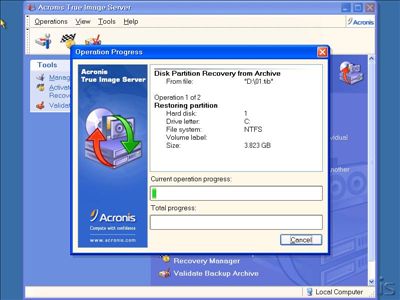
recovery. UniversalRestore for Acronis
True Image 9.1 Server Screenshot:
 |
 Acronis Universal Restore allows you to restore to different
hardware or to a virtual machine, providing complete disaster
recovery. Disaster recovery planning and tools that enable
business continuity are requirements for every business. Acronis
Universal Restore prepares you for even the most unforeseen
events.
Acronis Universal Restore allows you to restore to different
hardware or to a virtual machine, providing complete disaster
recovery. Disaster recovery planning and tools that enable
business continuity are requirements for every business. Acronis
Universal Restore prepares you for even the most unforeseen
events.
