|
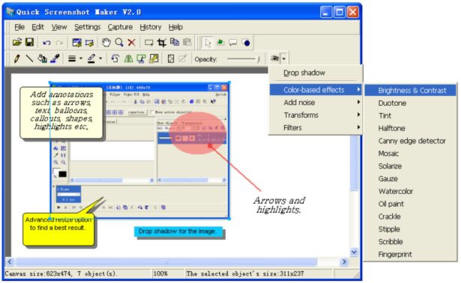
 !Quick Screenshot Maker is a powerful tool
for screen capturing, screen shot editing and image organization. It can
capture any part of the screen, including windows, regions, controls and
DirectX game screens. It also supports capturing cursors and long scroll
windows. It can perform timer-activated captures. !Quick Screenshot Maker is a powerful tool
for screen capturing, screen shot editing and image organization. It can
capture any part of the screen, including windows, regions, controls and
DirectX game screens. It also supports capturing cursors and long scroll
windows. It can perform timer-activated captures.
You can draw on each image, and crop, cut,
resize, rotate and mirror it. You can select transparent colors, change
opacity, drop shadows, change the brightness and contrast, and add more than
40 visual effects to images. Enhance your image by adding annotations such
as text, callouts, arrows, highlights to it, and easily change annotation
objects' position, size and other properties.
You can manage all the screenshots in the
History List bar, easily open or insert an image file to current screenshot
project. Make professional screenshot easily and quickly. |
|
Key features
of !Quick Screenshot Maker:
-
Include all the features
of !Quick Screen Capture
-
Capture cursor, long
scroll window. Timer-activated capture
-
Can capture screenshot and
directly send it to the current canvas
-
Edit several captures in
one screenshot project
-
Auto Trim the canvas to
fit all the objects on it
-
Advanced image resize: 12
filters to choose from to have a best result
-
Enable/Disable
transparency of an image, pick transparent color
-
Change image's opacity,
drop shadow, change brightness and contrast, add more than 40 visual
effects
-
Improve your captures by
adding annotations like images, balloons (text), shapes (arrows,
highlights). Easily change the properties of each object
-
Save as a project or
export to an image file (.bmp, .jpg, .gif, .png formats)
-
Quickly open a screenshot
file or insert it to the current canvas
!Quick
Screenshot Maker screenshot:

|