|
 Background
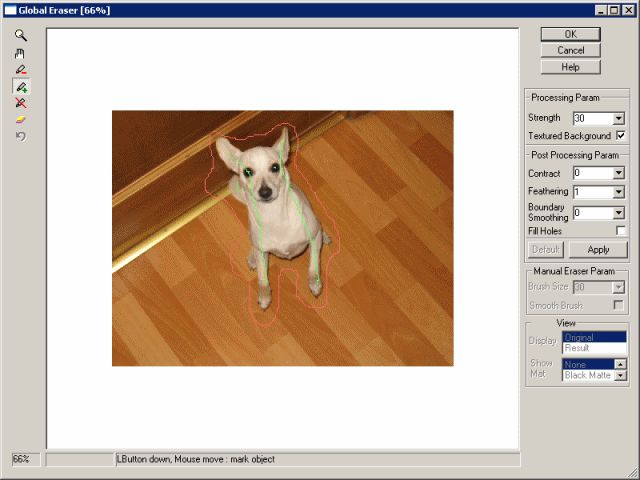
Remover is a Photoshop-compatible plug-in for Windows designed
by ImageSkill Sofware that can work with Adobe Photoshop, Corel
Paint Shop Pro etc. Background
Remover is a Photoshop-compatible plug-in for Windows designed
by ImageSkill Sofware that can work with Adobe Photoshop, Corel
Paint Shop Pro etc.
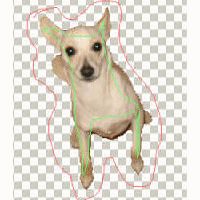
Background Remover cut objects out from images having complex
background content with the minimum efforts. Result may be used
for collage, scrap-book and greeting card creation. Now you can
process translucent areas.
In contrast to majority masking program such as: Adobe Magic
Extractor, Corel Knock-Out, Microsoft Expression and so on,
Background Remover allows to receive perfect result without
exact marking of an objects colors. You do not need accurately
draw out an object. You can simply mark colors inside and
outside object and press Apply. The efficiency of background
removing is adjusted by moving one slider only. Our product does
not leave noise on texture background (for example: grass,
leaves, small stones etc). It gives excellent result on simple
gradient background (sky, water etc) also.
You can extract semi-transparency objects (like wool or flying
away hears) now. You can receive attractive results and it takes
less time and efforts.
There are many additional possibilities - you can feather object
mask in order to receive soft transition. You can contract mask
in order to avoid undesirable border around objects and you can
smooth boundary contour of the object. Using Defringe tool you
can unmix colors for correct background replacing.
For the manual correction of the resulting image you can use
erase/restore brush. In erase mode brash has hard and soft
profile. The first one is used for the full background removing.
The second one is intended for the softening of the object
boundary in the place of interest. You can switch between
original image and result one and preview the extracted object
against a colored matte background.
Our product has simple install and uninstall procedures, help
and small tutorial.
|