|
|
|
Main
> Multimedia & Design > Authoring
Tools > Word to PDF Converter |
 Word
to PDF Converter is the fast, affordable way to create professional-quality
documents in the popular PDF file format. Its easy-to-use interface allows
you to create PDF files by simply click the "Save as PDF" button from MS
Word, creating documents which can be viewed on any computer with a PDF
viewer. Word
to PDF Converter is the fast, affordable way to create professional-quality
documents in the popular PDF file format. Its easy-to-use interface allows
you to create PDF files by simply click the "Save as PDF" button from MS
Word, creating documents which can be viewed on any computer with a PDF
viewer.Word to PDF Converter
supports Font embedding, resolution, compression and multi-language. It
quickly convert word document to PDF format. It is very powerful and
easy-to-use. It support all popular PDF format. It allows you to customize
page size,page color,font,font style,font size,fond color, etc in the PDF
file. It can be run independently, does not need Adobe Acrobat.
|
|
Buy
Now |
|
Key features
of Word to PDF Converter:
-
Easy
Converting Microsoft Word documents into PDF normal files couldn't be
any easier. Simply open the DOC file you want to convert into PDF file
and click the "Save as PDF" button in the Microsoft Word toolbar, Word
to PDF Converter quickly re-creates your DOC file as a fully formatted
PDF files
-
Fast
Get the job done in seconds or minutes, not hours or days. Word to PDF
Converter eliminates the need to re-key and re-format PDF documents,
saving you both time and money
-
Accurate
You will be amazed at the results you get from Word to PDF Converter.
It accurately retains the layout of the original Doc file. Converts
text in over 100 languages and separates graphics from tables and text
-
Powerful
Now you can do more than view PDF files. Document Format (PDF) is the
fact standard for the secure and reliable distribution and exchange of
electronic documents and forms around the world, and now you can
convert any Ms word documents into professional-quality PDF file
format only by one click
System
Requirements:
-
x86-based
personal computer
-
Microsft
Word 2000 or Higher
-
No less
than 32MB application RAM
-
30 MB hard
disk space
-
Screen
resolution must be no less than 640x480 pixels
-
This
product is licensed as a single product for a single system
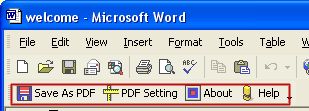
Word to PDF Converter screenshot:
|
|
|
