|
 PackPal flash gallery maker is a tool which can exhibit various galleries of pictures, photos, and other photographs with descriptions. This software does not need any server-side language and can operate on any web host. PackPal flash gallery maker is a tool which can exhibit various galleries of pictures, photos, and other photographs with descriptions. This software does not need any server-side language and can operate on any web host.
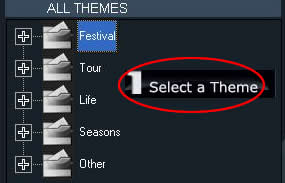
To show a gallery with multiple themes is not a dream, you can achieve it by this software online. To produce an excellent gallery is just three simple steps by this software: Select a Theme, Edit Albums and Build. There are five classic themes you can choose, including: Festival, Tour, Life, Seasons and others. You can add your favourite song into any photo gallery in order that you could listen to the music as well as view these pictures at the same time. Packpal Flash Gallery Maker must be your first choice to collect, classify, manage and display photos.
Three simple steps to build an excellent gallery:
The first step is to click the button "Select a Theme". Five Big
themes are involved in it. There are: Festival, Tour, Life,
Season and Others. In Festival category, it contains seven
themes: Christmas, New Year, Valentine, Halloween, Thanks
giving, April fool day and Birthday. You can choose any one you
like to build a gallery. T
The second step is called :Edit Album. By pressing the buttons "Add album(s)" or "Delete this album", you can produce a album or delete one made album. After adding a album, you can add the photos you want or delete the photos you dislike by clicking the buttons "Add photo(s)
or "Delete this photo". You may change the Album name on the
right hand side table. This table displays the Date you built
the Album, the numbers of pictures and the information of these
photos as well.
The third step is just to press button "Build". After Changing
the Gallery Title, Output Path of this Album and adding the
Background music, just click the button "Build", a wonderful
gallery will be displayed.
|