|
|
|
Main
> Multimedia & Design > Authoring
Tools > Image to PDF Desktop Application |
 Convert one or more images
(JPG, TIF, PNG, GIF, BMP, WMF, EMF, PCX, TGA)
into PDF through an easy to use/intuitive Windows interface sectioned into
tabs. Supports clickable image stamps (eg company logo), bookmarks, create
simple full screen PDF slideshows (with transitions) and supports all the
usual PDF document options. Convert one or more images
(JPG, TIF, PNG, GIF, BMP, WMF, EMF, PCX, TGA)
into PDF through an easy to use/intuitive Windows interface sectioned into
tabs. Supports clickable image stamps (eg company logo), bookmarks, create
simple full screen PDF slideshows (with transitions) and supports all the
usual PDF document options.
Image to PDF is NOT an Adobe Acrobat plug-in and it does NOT require Adobe
Acrobat in order to run or produce PDF documents. |
| Buy
Now |
|
Key features
of Image to PDF Desktop Application:
-
Automatically convert images into PDF documents with
our easy to use and intuitive interface
-
Converts JPG, TIF, PNG, GIF, BMP, WMF, EMF, PCX and
TGA images
-
Combine up to 1000 images into one PDF document
-
Supports multi-page TIFF and Animated GIF images
-
Or convert each image into it's own separate PDF
document
-
Include a clickable image stamp (eg logo) on each page
of the output PDF document
-
Produce a simple full screen PDF slideshow complete
with transitions between pages
-
Password protect output PDF document
-
Optional borders between image and edge of PDF page
-
Include a bookmark in the output PDF for each image
-
Set the DPI resolution of the output PDF to between 9
and 2880 DPI
-
Set PDF permissions to restrict printing, copying and
modification
-
Set PDF meta information (author, title, subject,
keywords, creator, producer, creation date)
-
Set preferred PDF viewer options (center window, hide
toolbar, hide menu bar, hide window user interface, fit window, page
mode none/outlines/thumbnails/full screen, page layout single page/one
column/two column left/two column right)
-
Does NOT require Adobe Acrobat software for creation
-
Free upgrades to all future versions
System
Requirements:
Image to PDF Desktop
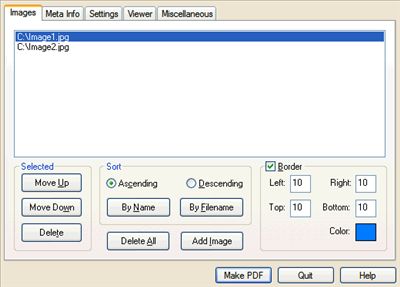
Application screenshot:
|
|
|
