|
|
|
Main
> Multimedia & Design > Authoring
Tools > CopyToDVD |
 CopyToDVD is a new generation
tool to backup all your music and data files, include: copy dvd, copy cd,
burn data, video and audio fiels. CopyToDVD contains several
methods to build your CDs or DVDs, such as integration to shell, user
friendly frontend or FileDepot technology. With a few clicks you can burn
files, folders, pictures, and music (MP3/Ogg Vorbis/WMA) to CD/DVD.
CopyToDVD detects if you are just want to do a data backup, or create an
audio CD. CopyToDVD is easy to use, don't lose your time with complex
interfaces. If you are a developer, you can use CopyToDVD to add a burning
feature to your application. CopyToDVD supports CD-R(W), DVD-R(W), and
DVD+R(W) writers. CopyToDVD is a new generation
tool to backup all your music and data files, include: copy dvd, copy cd,
burn data, video and audio fiels. CopyToDVD contains several
methods to build your CDs or DVDs, such as integration to shell, user
friendly frontend or FileDepot technology. With a few clicks you can burn
files, folders, pictures, and music (MP3/Ogg Vorbis/WMA) to CD/DVD.
CopyToDVD detects if you are just want to do a data backup, or create an
audio CD. CopyToDVD is easy to use, don't lose your time with complex
interfaces. If you are a developer, you can use CopyToDVD to add a burning
feature to your application. CopyToDVD supports CD-R(W), DVD-R(W), and
DVD+R(W) writers. |
| Buy
Now |
|
Key features
of CopyToDVD:
- Audio: Create Audio CDs from MP3, WMA, Ogg Vorbis, MusePack and APE
file formats.
- Data: Create CDs and DVDs using ISO/Joliet/UDF. Multi session
feature allows you to add to your media in stages.
- Video: Create high quality DVD Video backups to be played on your PC
or home DVD player. Copy DVD video with high playability.
- Settings: Customize the way you wish to use the software by the
large number of settings available.
- Compatibility: Supports any CD or DVD writer.
- burn iso files in 1 click
- Developers: Add a CD or DVD burning feature to your application
using the batch/command line mode of CopyToDVD (complete SDK on
request)
- Latest technologies including Double Layer and HD-Burn
- Multilingual support
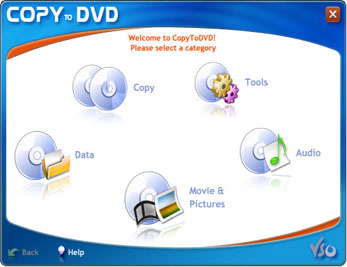
CopyToDVD screenshot:
|
|
|
