|
|
|
Main
> Multimedia & Design > Animation
> Save Flash |
 Save Flash is the most
versatile tool with which you can save any flash animation with just a
single click. All your favorite flash games, flash cards, flash banners
and cartoons can be saved with just a single click and made available as a
collection offline. This tool displays the flash files size, its URL and
name, the tool comfortably saves the flash to the chosen directory and
allows you to conveniently view the preview in an enlarged mode, rewind or
forward view, pause, loop and even scale. The tool is enhanced with the
feature to either save the complete web page or all the flash files or
each and every flash file separately. Easy screenshots can be made from
any flash frame and saved to graphic format. This tool can be easily and
quickly accessed by the floating drop-down menu and is backed up by full
technical support and discounted upgrades. This versatile tool packed with
easy to use features is also supported with multilingual interface. Save Flash is the most
versatile tool with which you can save any flash animation with just a
single click. All your favorite flash games, flash cards, flash banners
and cartoons can be saved with just a single click and made available as a
collection offline. This tool displays the flash files size, its URL and
name, the tool comfortably saves the flash to the chosen directory and
allows you to conveniently view the preview in an enlarged mode, rewind or
forward view, pause, loop and even scale. The tool is enhanced with the
feature to either save the complete web page or all the flash files or
each and every flash file separately. Easy screenshots can be made from
any flash frame and saved to graphic format. This tool can be easily and
quickly accessed by the floating drop-down menu and is backed up by full
technical support and discounted upgrades. This versatile tool packed with
easy to use features is also supported with multilingual interface. |
|
Download |
Buy
Now |
|
Key features
of Save Flash:
-
Possibility to save from a complete
web page either all flash files or every flash file separately.
-
Convenient flash files’ preview
(rewind/forward view, pause, loop, scale).
-
You can make a screenshot from any
flash frame and save it as a graphic file.
-
Every flash file can be saved by
right mouse click.
-
Quick access to Save Flash
interface using floating drop-down menu.
-
You can get useful additional info
about a flash file right at a site (URL, size, resolution, scale,
etc.)
-
Multilanguage interface.
System
Requirements:
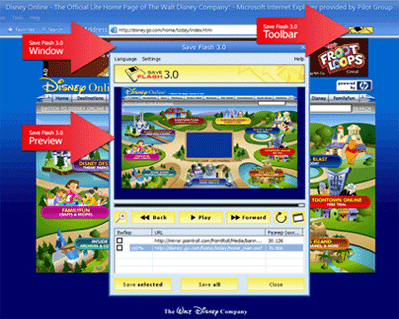
Save Flash screenshot:
|
|
|
Product
Information
|
-
Version: 3.0.67
-
Price:
$19.99
-
Size:
0.57
MB
-
License:
Shareware
-
Developer:
Pilot
Group
-
OS:
Windows All
-
Rating:

|
|
|
|