-
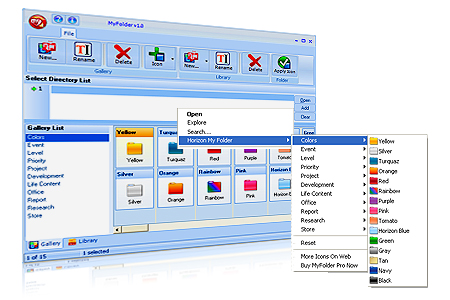
Click on a folder with the right
button of the mouse and change the folder icon by My Folder.
-
By clicking right button of the
mouse on the folder; you can reach all the galleries those
defined submenu under Horizon Myfolder Menu.
-
Appearance of the any icons listed
can be changed.
-
Changing shape and color of the
folders makes easier and faster Windows.
-
Appearance of the folders is up to
your choice by My Folder
-
Customize your computer by My
Folder.
-
Resetting and getting back to
original icon is possible.
-
Adding new icon and changing the
look of the folders are possible.
-
Folder icons can be stored as many
as wanted under My Folder gallery section.
-
You can create particular icon
library and control the icons by My Folder
-
Icons defined in My Folder library
can be transferred to the galleries in gallery section.
-
My Folder provides adding folders
with dll. exe. and icl. extensions to the library.
-
Icon in library can be sent to
gallery and used there.
Gallaries in My Folder
-
Colors.Levels, Project Galleries
-
Easy to use,
-
Accelerates the process
-
Folder organizing is quicker.
 Click on a folder with the right button of the mouse and change the folder icon by My Folder. By clicking right button of the mouse on the folder; you can reach all the galleries those defined submenu under Horizon Myfolder Menu. Appearance of the any icons listed can be changed. Changing shape and color of the folders makes easier and faster Windows. Appearance of the folders is up to your choice by My Folder Customize your computer by My Folder. Resetting and getting back to original icon is possible. Adding new icon and changing the look of the folders are possible. Folder icons can be stored as many as wanted under My Folder gallery section. You can create particular icon library and control the icons by My Folder Icons defined in My Folder library can be transferred to the galleries in gallery section. My Folder provides adding folders with dll. exe. and icl. extensions to the library. Icon in library can be sent to gallery and used there. Gallaries in My Folder Colors.Levels, Project Galleries Easy to use, Accelerates the process Folder organizing is quicker.