|
|
|
Main
> Desktop
Enhancements >
Icon tools> IconXP |
 Aha-soft
IconXP allows you to edit icons and customize the Windows desktop
appearance. It supports the new icon format introduced in Windows XP
(employs smooth transparency and other visual effects). Using this program
you can create and edit icons in either standard or custom sizes, with color
depths up to 32-bit True Color with 8-bit alpha channel. Paint tools
include: color replacer, color selector, spray can, pencil, brush, flood
fill, text tool, line tool, rectangle, curve, ellipse, 3d frame. Modifiers
can also be used to apply color gradients and chess fills. For Windows XP
icons, you get to add cool drop shadow and smooth effects. Aha-soft
IconXP allows you to edit icons and customize the Windows desktop
appearance. It supports the new icon format introduced in Windows XP
(employs smooth transparency and other visual effects). Using this program
you can create and edit icons in either standard or custom sizes, with color
depths up to 32-bit True Color with 8-bit alpha channel. Paint tools
include: color replacer, color selector, spray can, pencil, brush, flood
fill, text tool, line tool, rectangle, curve, ellipse, 3d frame. Modifiers
can also be used to apply color gradients and chess fills. For Windows XP
icons, you get to add cool drop shadow and smooth effects.
IconXP supports .ico, .ani, .cur, .wmf, .emf, .bmp, .jpg, .jpeg, .gif, .png,
.xpm, .xbm, .wbmp and Adobe Photoshop .psd file formats. You can import
images from screen captures. IconXP allows you to import, export and change
color palettes for icon images.
IconXP allows you to change standard Windows icons, folder icons and
customize desktop attributes. You can easily replace, colorize and save the
icons Windows uses to display various objects - My Computer, Recycle Bin,
Internet, Start menu items, drives, system folders and your own folders. You
can also hide or change shortcut overlays. There are also commands that
change the desktop icons size and color resolution, and rebuild the icon
cache. |
|
Buy
Now |
|
Key
features of IconXP:
- Create and edit icons in
either standard or custom sizes, in color depths up to 16
million colors
- Create and edit icons for
Windows XP in 32-bit color depth with 8-bit alpha channel
- Open and edit images in sizes
up to 3000x3000
- Import images in various
graphic formats (ICO, ICPR, BMP, JPEG, ANI, CUR, GIF, PNG, WMF,
XPM, XBM, WBMP and Adobe Photoshop PSD) directly into icons
- Export icon images to ICO,
ICPR, BMP, JPEG, CUR, PNG, GIF, RC, XPM, XBM, WBMP and Adobe
Photoshop PSD files
- Capture screen images
- Paint images with gradient and
chess fill
- Modify images with drop
shadow, smooth, rotate, grayscale, colorize, hue saturation,
roll and mirror effects
- Replace image colors
- Import and export icon color
palettes
- Sort images inside icons
- Modify the default icons
Windows uses to display My Computer, Recycle Bin, Internet,
Start menu items, drives, shortcut and sharing overlays,
system folders and other objects
- Customize your desktop
attributes
- Customize your folder icons
System
Requirements:
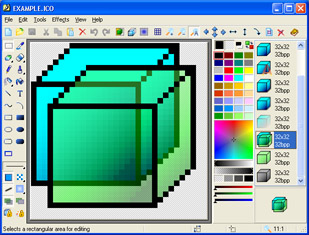
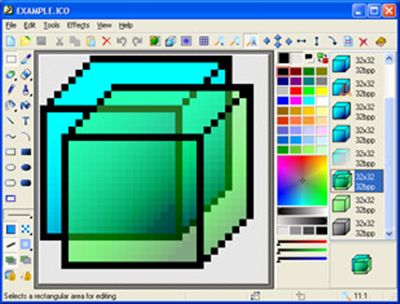
IconXP screenshot:
 |
|
|