|
|
|
Main
> Desktop
Enhancements >
Icon tools > IconLover |
 IconLover
gives professional and amateur artists the ability to design and edit all
the graphics required in the software development cycle, including icons,
static and animated cursors, and other interface elements. All these
graphics can now be designed in a single application. IconLover
gives professional and amateur artists the ability to design and edit all
the graphics required in the software development cycle, including icons,
static and animated cursors, and other interface elements. All these
graphics can now be designed in a single application.
IconLover offers a variety of features that cannot be found in standard
graphics applications. IconLover includes the ability to import icons from
executables, image and library files. The built-in search and extract
function enables busy artists to scan through the contents of a folder or a
drive and arrange all images found in any files into a single icon library
for easy and effective management.
This program features a greatly improved image editor that offers graphic
artists a number of breakthrough features, including the ability to create
icons with several raster layers. Layers give you more freedom in using
complex graphic tools and creating profession images. This new feature
enables Aha-Soft IconLover to rival any high-end graphics package. In fact,
IconLover is better than any other high-end tool when considering the
creation of icons and other small graphics.
IconLover is supplied with all the essential drawing tools, including
various kinds of airbrushes, pencils and paintbrushes, as well as
miscellaneous text, line and shape tools. The software is equally well
equipped in the effects department and offers a variety of solid, patterned
and gradient flood fills, drop shadow, smooth, color modification and other
effects. The native support for the Windows XP icon format enables artists
to create 32-bit icons. IconLover also includes a number of unique features
including the ability to apply effects to multiple images in the icon
collection.
Other new features in IconLover include the support for large images, the
ability to export and import transparent PNG images, the ability to export
all images from a library to a single 32-bit image and an improved
interface. |
|
Buy
Now |
|
Key
features of IconLover:
- Support for Windows Vista
icons
- Ability to draw smooth lines
and shapes
- Ability to print icons
- Brightness, contrast,
smoothing and sharpness effects
- Manage icons, static and
animated cursors, icon and cursor libraries and image lists
- Create and edit smooth
semi-transparent icons, static and animated cursors for
Windows XP
- Create and edit icons in
standard and custom sizes, with color depth up to 32-bit True
Color
- Make stylish icons from your
images
- Paint images with gradients
and fills
- Create multi-layer images
- Modify images with drop
shadow, opacity, smoothing, negative, grayscale, colorization,
rotation, roll and mirror effects
- Import and export ICO, BMP,
JPEG, ANI, CUR, GIF, PNG, TGA, TIFF, WMF, WBMP, XPM, XBM and
Adobe Photoshop PSD image formats
- Import Mac OS icons from ICNS
and RSRC files
- Manage icon libraries for
better and more efficient image storage
- Extract icons from Windows
executables, libraries and animated cursor files, ZIP and RAR
archives
- Download icons from the
Internet
- Modify icons inside
executables
- Search in folders for icons
and cursors
- Convert or apply effects to
multiple icons at once
- Customize desktop and folder
icons
System
Requirements:
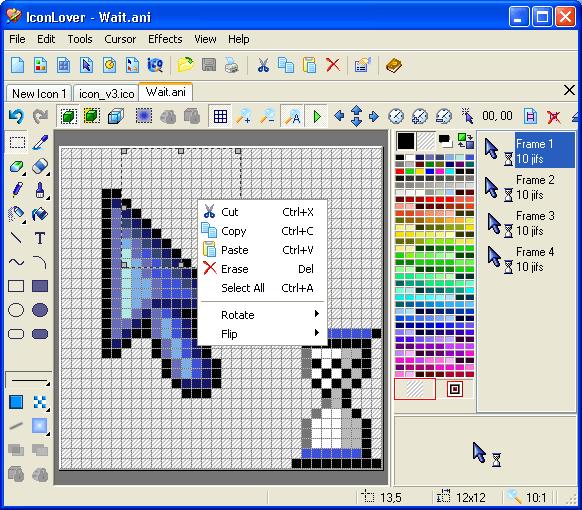
IconLover screenshot:
 |
|
|