|
|
|
Main
> Desktop
Enhancements > Font Tools > Font
Fitting Room Deluxe |
 A
font set manager tool with preview for both installed and yet to be
installed fonts, full character map and multilingual name property support,
helps you to activate/deactivte and preview various font types with maximum
efficiency. A
font set manager tool with preview for both installed and yet to be
installed fonts, full character map and multilingual name property support,
helps you to activate/deactivte and preview various font types with maximum
efficiency.
It handles the most popular font types used on PC today, helps you to add
them to and remove from system easier. These font types include True Type
font(*.ttf, *.ttc), Open Type font(*.ttf, *.ttc,*.otf),PostScript Type 1
font(*.pfm,*.pfb), and Microsoft Windows font(*.fnt, *.fon).
The Set Manager helps you mark a group of fonts to be treated as a
collection set that could be activated or deactivated simultaneously. You
can also select a font set for preview without activating it at all.
Character map displays all the supported characters of a font, with a
magnified window appeared for any selected char. You needn't install the
font to see this feature. In this way you can get a full impression of the
font before actually install it into system.
Property shows name table strings for Open Type font, catagoried by locale.
You can find how font typeface name presented in different locales, and many
other useful information.
Font Fitting Room is Unicode based which allows you to type sample sentence
simultaneously containing any different locale characters. For example, you
can preview Chinese and Korean characters in the same sample string.
LCD ClearType tuning function is an add-on feature to make ClearType font
smoothing more convenient. |
|
Buy
Now |
|
Key
features of Font Fitting Room Deluxe:
-
Preview: You can
preview the custom sample text with a font list without
actually installing them.
-
You will see the
installed fonts every time when application starts.
-
The application
always list the font name together with its associated
file(s) in the left bar, while sample text is displayed in
the right pane.
-
You can play
with following preview features: Sample Text, Font Size,
Bold Style, Italic Style, Underline Style, Foreground Color,
Background Color.
-
Character Map:
You can turn on the Character Map to see the whole supported
characters in the selected font.
-
You don't need
to install the font in order to display its character map.
-
You can click on
a character grid to see the magnified char.
-
Property: You
can get more information about a font by see into its
properties.
-
For True Type
font, you can see multilingual strings associated with the
font.
-
For FON, FNT and
PostScript Type 1 font, you will see basic information of
the font.
-
Install and
Uninstall: You can easily installed a font from anywhere
accessible to system, or uninstall a system font and put it
into Recyle Bin.
-
All the font
types listed above can be easily installed to system or
removed to Recycle Bin.
-
ClearType
Tuning: If you are using a LCD monitor, probably you need
this ClearType adjusting facility.
-
You can activate
this function to switch the system smoothing mode, set
ClearType contrast value, or change LCD striping order
setting. You would see the setting change effects
immediately on the screen.
-
Unicode based.
-
Set Manager:The
Set Manager helps you mark a group of fonts to be treated as
a collection set that could be activated or deactivated
simultaneously.
-
Drag-and-drop is
supported. You can add fonts from within the program or drag
font files from windows explorer and drop in the
application.
-
Each font set
has a "default font path", that is set to the folder of
fonts which are added in when the set is empty.
-
Multi-level set
structure is presented for the organization.
Font
Fitting Room Deluxe screenshot:
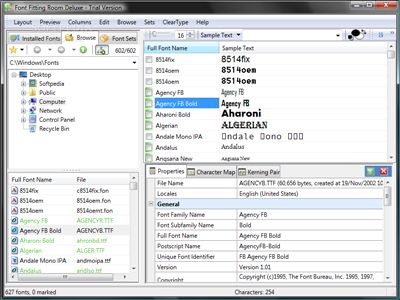 |
|
|
Product
Information
|
-
Version: 2.9.6.3
-
Price:
$39.95
-
Size:
2.67MB
-
License:
Shareware
-
Developer:
ApoliSoft
-
OS:
Windows
All
-
Rating:

|
|
|
|
