|
|
|
Main
> Audio & MP3 > Music
Maganement > Audio Tags Editor |
 Audio
Tags Editor is a convenient and powerful audio file tags editor.
It enables you to edit tags, rename files, folders, export data to
various formats, save playlists and much more. Audio Tags Editor
will let you put your audio files collection in order! Audio
Tags Editor is a convenient and powerful audio file tags editor.
It enables you to edit tags, rename files, folders, export data to
various formats, save playlists and much more. Audio Tags Editor
will let you put your audio files collection in order!
Audio Tags Editor allows you to do without separate tag editing
dialogs and edit them directly in the list cells. It makes the tag
editing process similar to editing spreadsheets. Nevertheless, the
software has a convenient form for editing the tags of separate
files or a group of selected files.
Audio Tags Editor allows you to receive the information on the
album from the public FreeDB database. The software will
automatically single out album tracks from the list and receive
the list of suitable albums according to the number and length of
the tracks. You will only have to select one album, and the
program will fill in the tags with the received information.
Audio Tags Editor contains an unique feature of a massive FreeDB
search. That means that you can retrieve information about music
albums for any number of folders at once. This feature allows you
to put a music collection in order as fast as possible, almost in
one click!
Audio Tags Editor allows you to change tags in all subfolders.
This unique feature allows you, for example, to rename the
comments in your entire audio collection at once no matter how
many subfolders there are in it! When you open folders, files in
them are analyzed and you can see the total play time, the average
bitrate and the size of audio files in the album.
Audio Tags Editor allows you to organize and structure your music
collection directly from the software. Using Audio Tags Editor,
you can copy, move, delete and rename files and folders. The
selected files can be renamed and saved in the playlist with one
click according to the template you specify.
|
| Buy
Now |
|
Key
features of Audio Tags Editor :
-
Editing tags of the MP3 format
-
Editing tags of the OGG format
-
Editing tags of the WMA format
-
Editing tags of the ASF format
-
Editing included lyrics and pictures
-
Editing tags directly in the list cells
-
Obtaining information from the FreeDB database and
automatic tag filling for a number of folders (unique)
-
Obtaining information from the FreeDB database for audio
discs
-
Editing tags for entire folders and their subfolders
-
Automatically collecting statistics for folders: track
length, average bitrate and file size
-
Copying the tags of the selected files onto the clipboard
-
Exchanging frame contents
-
Renaming files and folders including the quick renaming
mode (by template)
-
Advanced files search with tags parameters (unique)
-
Creating playlists including the quick creating mode (by
template)
-
Displaying subfolders in the list
-
Automatically filling track numbers
-
Drag and Drop support
-
Deleting files and folders
-
Select Files Only mode
-
Monitoring changes in the active folder
-
Controlling and playing files in Winamp
-
Flexible and customizable interface
-
Updating the software via the Internet.
System
Requirements:
-
CPU: 80386/486 based IBM PC compatible computer (or higher)
-
RAM: 16MB of free memory
-
Hard Disk: About 3000 KByte of free hard disk space
-
Device: Mouse
-
Video: SVGA card with High color mode.
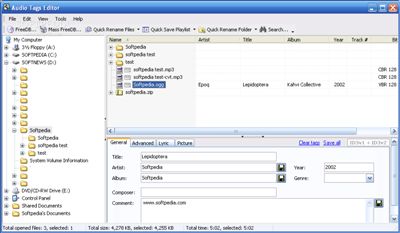
Audio Tags Editor screenshot:
 |
|
|

