|
|
|
Main > Audio & MP3 >
Music Creation > Easy Audio Editor |
 Easy
Audio Editor is a visual multifunctional audio files editor which
allow you to perform various operations with audio data such as
displaying a waveform image of an audio file, filtering, applying
various audio effects, format conversion and more. It supports all
major audio and video formats. Easy
Audio Editor is a visual multifunctional audio files editor which
allow you to perform various operations with audio data such as
displaying a waveform image of an audio file, filtering, applying
various audio effects, format conversion and more. It supports all
major audio and video formats. |
|
Buy Now |
|
Key features of Easy Audio Editor:
-
Open, create,
play and save audio files
-
Extract audio
from video files
-
Convert audio
from text (Text To Speech)
-
Adjust stereo
channels or make duetto
-
Record new audio
file from a microphone, sound card or other input devices
(you can record audio from DVD / VCD / CD Player, MP3
Player, RealPlayer, Windows Media Player, Web Page, Internet
Conversation, Internet News, Internet Radio Station and
more)
-
Visually edit an
audio file (Delete, Cut, Copy, DeleteSilence, Paste,
PasteFromFile, Mix, MixFromFile)
-
Apply different
effects (Amplify, Delay, Equalizer, Fade, Flanger, Invert,
Normalize, Reverse, MultiTapDelay, Silence, Stretch,
Vibrato, Echo, Chorus)
-
Apply different
filters to the selected part of an audio file (BandPass
Filter, FFT Filter, HighPass Filter, HighShelf
Filter,LowPass Filter, LowShelf Filter, Notch Filter)
-
Insert noise or
silence in an audio file
-
Convert an audio
file from one format to another
-
Convert the
sample type of audio files
-
Insert and
change information about audio markers (Count, Country,
Dialect, Label, Language, Length, Note, Num, Position, Text)
-
Insert and
change information about an audio file (Album, Artist,
Channels, Comments, Copyright, Genre, Title, Year)
-
Use marker to
locate the selected part or special part of the audio data
System Requirements:
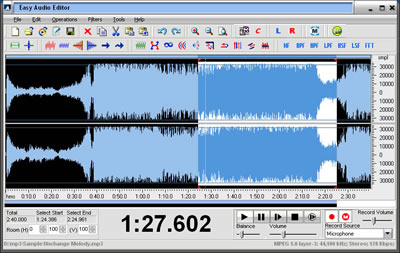
Easy
Audio Editor screenshot:
 |
|
|
